使用 API 创建 Port
本文介绍通过 API 创建 Port 的流程,包括如何查找 Port 位置、验证 Port 并确定费用、订购 Port,以及下载 授权函 (LOA)授权函 (LOA) 是客户需要向其数据中心服务商出示的文件,用于在其数据中心服务与其 Port 之间建立物理交叉连接。当客户开通新的 Port 时,可通过 Megaport Portal 获取该 LOA。
。
开始之前,请先获取有效的访问令牌。有关详细信息,请参见 创建 API 密钥。
在 Postman 集合中查找 Port 位置详细信息
-
在左侧导航中点击 Locations(位置),然后点击 GET Locations (v3)(获取位置 (v3))。
此请求不需要参数或请求体信息。 -
点击 Send(发送) 以发出请求。
GET {baseUrl}/v3/locations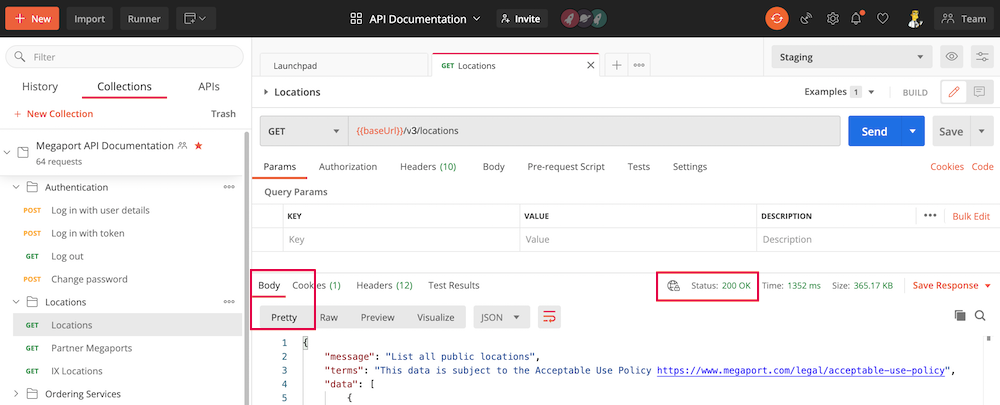
通过查看 Status: 200 OK 来确保请求成功,并在 Body 部分以 Pretty 格式显示响应。
该请求将返回数百个 Port 位置。您可以单击放大镜并在搜索字段中输入特定城市、数据中心或其他参数进行搜索。此示例使用 Digital Realty,London 位置。
{
            "id": 89,
            "name": "Digital Realty London LHR20",
            "address": {
                "street": "227 Marsh Wall",
                "suburb": null,
                "city": "London",
                "state": null,
                "postcode": "E14 9SD",
                "country": "United Kingdom"
            },
            "dataCentre": {
                "id": 3,
                "name": "Digital Realty"
            },
            "metro": "London",
            "market": "UK",
            "status": "Active",
            "longitude": -0.012144,
            "latitude": 51.499714,
            "orderingMessage": null,
            "diversityZones": {
                "red": {
                    "mcrSpeedMbps": [
                        5000,
                        100000,
                        1000,
                        25000,
                        10000,
                        2500,
                        50000
                    ],
                    "megaportSpeedMbps": [
                        100000,
                        10000,
                        1000
                    ],
                    "mveMaxCpuCoreCount": null,
                    "mveAvailable": true
                },
                "blue": {
                    "mcrSpeedMbps": [
                        1000,
                        2500,
                        5000,
                        10000
                    ],
                    "megaportSpeedMbps": [
                        1000,
                        10000,
                        100000
                    ],
                    "mveMaxCpuCoreCount": null,
                    "mveAvailable": true
                }
            },
            "productAddOns": {
                "crossConnect": {
                    "available": false,
                    "type": null
                }
            }
        }
要创建一个Port,您需要 market 值和 id 值。在本例中,market 为 UK,数据中心 ID 为 89。
测试和验证Port订单
-
在 Postman 中,打开左侧导航栏的 Ports 文件夹,并选择 POST Validate Port Order (v3)。
-
更新 Body 中的
locationId(89)、term(按月数填写 - 1、12、24、36、48 或 60)、productName(为您的Port指定任意名称)、portSpeed(1000、10000 或 100000 Mbps),以及market(UK),然后点击 Send。
[
  {
    "locationId": 89,
    "term": 1,
    "locationUid": null,
    "productName": "API Port",
    "productType": "MEGAPORT",
    "createDate": 1452475039656,
    "portSpeed": 1000,
    "virtual": false,
    "promoCode": "promox3mnthfree2",
    "market": "UK"
  }
]
成功的响应将通过验证,并返回 200 OK 状态。响应中还包含该服务的定价详情。
{
    "message": "Validation passed",
    "terms": "This data is subject to the Acceptable Use Policy https://www.megaport.com/legal/acceptable-use-policy",
    "data": [
        {
            "price": {
                "hourlySetup": 0,
                "dailySetup": 0,
                "monthlySetup": 0,
                "hourlyRate": 0,
                "dailyRate": 0,
                "monthlyRate": 500.00,
                "fixedRecurringCharge": 500.00,
                "postPaidBaseRate": "no base rate",
                "longHaulMbpsRate": 0,
                "mbpsRate": 0,
                "currency": "GBP",
                "key": "no key",
                "productType": "MEGAPORT",
                "empty": false
            },
            "serviceName": "API Port",
            "productType": "MEGAPORT",
            "productUid": "f9859fd3-344d-4a33-8cd2-a3b6ebfaaef0",
            "market": "UK",
            "string": "London"
        }
    ]
}
订购已验证的 Port
-
对 Port 请求完成验证并审阅费用信息后,从 POST Validate Port Order (v3)(验证 Port 订单 (v3)) 的 Body 复制内容,并将其粘贴到 POST Buy Port (v3)(购买 Port (v3)) 的 Body 中。
重要
如果您在 api.megaport.com 上发出此调用,您的账户将为该服务产生费用。或者,您也可以像这些示例一样,针对预生产 API 进行开通(不会产生费用)。
-
发送请求。
成功的响应包括technicalServiceUid,其与productUid相同。
在我们的示例中,该值为 a49cf3f1-20a1-4390-93aa-5005bdafe3d7。
{
    "message": "MEGAPORT [a49cf3f1-20a1-4390-93aa-5005bdafe3d7] created. ",
    "terms": "This data is subject to the Acceptable Use Policy https://www.megaport.com/legal/acceptable-use-policy",
    "data": [
        {
            "serviceName": "API Port",
            "name": "API Port",
            "secondaryName": null,
            "technicalServiceId": 68124,
            "technicalServiceUid": "a49cf3f1-20a1-4390-93aa-5005bdafe3d7",
            "requestedDate": 1588862976322,
            "configuredDate": null,
            "currentEstimatedDelivery": null,
            "companyName": "Megaport Lab",
            "companyId": 2278,
            "aggregationId": null,
            "lagPrimary": false,
            "billingContactName": null,
            "billingContactId": null,
            "adminContactName": null,
            "adminContactId": null,
            "technicalContactName": null,
            "technicalContactId": null,
            "salesName": null,
            "salesId": null,
            "billableId": 56333,
            "billableUsageAlgorithm": "NOT_POST_PAID",
            "productType": "MEGAPORT",
            "provisioningStatus": "DEPLOYABLE",
            "inAdvanceBillingStatus": "NOT_ACTIVATED",
            "provisioningItems": [],
            "tags": [],
            "vxcDistanceBand": null,
            "intercapPath": null,
            "marketplaceVisibility": true,
            "vxcPermitted": true,
            "vxcAutoApproval": false,
            "createDate": 1588862976322,
            "terminationDate": null,
            "contractStartDate": 1588860000000,
            "contractTermMonths": 1,
            "rateType": "MONTHLY",
            "trialAgreement": false,
            "payerCompanyId": null,
            "nonPayerCompanyId": null,
            "minimumSpeed": null,
            "maximumSpeed": null,
            "rateLimit": 10000,
            "errorMessage": null,
            "market": "UK",
            "accountManager": null,
            "promptUid": null,
            "components": [],
            "attributes": [],
            "aLocation": null,
            "bLocation": null,
            "aLocationId": null,
            "bLocationId": null,
            "attributeTags": {},
            "createdBy":  "a51cc1c6-95a0-48c7-a5a0-e49d77a6c536",
            "buyoutPort": false,
            "virtual": false,
            "locked": false,
            "adminLocked": false
        }
    ]
}
新的 Port 现在会出现在您的工作环境中,可能是 portal.megaport.com 或 portal-staging.megaport.com
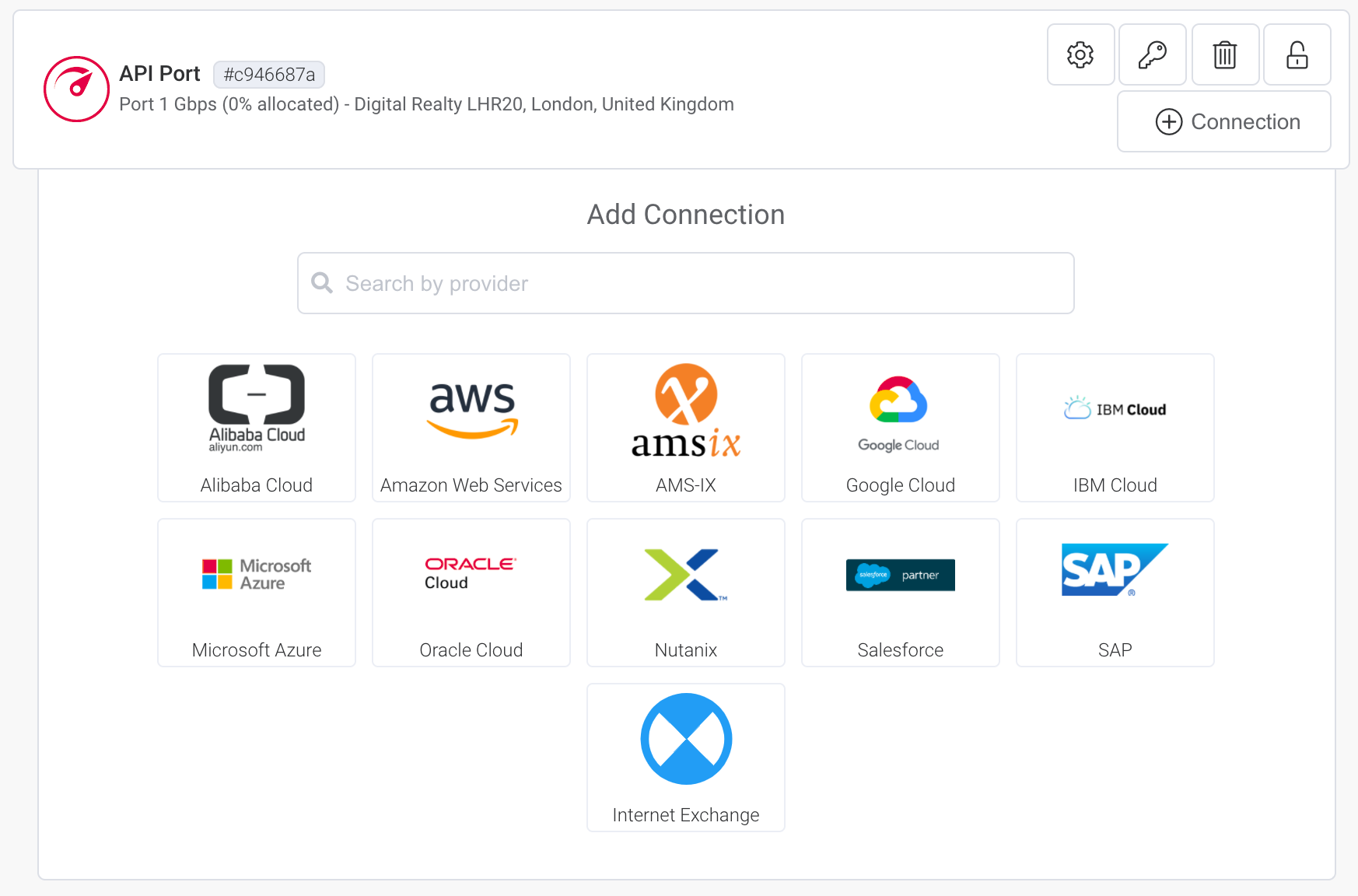
提示
若要查看此示例中使用的请求的所有选项,请参见 https://dev.megaport.com。
下载授权函 (LOA)
创建 Port 后,您可以下载 LOA。
注意
在您下载 LOA 之前,Port 的 Provisioning Status 必须为 Configured。
下载 LOA
-
在 Postman 中,展开左侧导航中的 Ports(端口),并选择 GET Regenerate LOA for Megaport Service(为 Megaport 服务重新生成 LOA)。
-
在 GET 命令中,将
productID替换为创建 Port 时生成的值。 -
发送请求。
当返回 200 OK 响应时,Body 部分会显示以下消息:
无法预览此响应。
请下载该响应并使用合适的应用程序打开。
出现此消息是因为 LOA 是 PDF 文档,必须下载。要下载,请在 Postman 中点击 Save Response(保存响应),并将该 PDF 保存到合适的位置。